
How to order groceries online for delivery to your door


A trip to the grocery store often involves driving in a hot car, walking down long aisles, searching for items, loading and pushing a cart, waiting in line, and carrying heavy bags into your home. Would you like to eliminate much of that work? In this article, learn how online grocery shopping lets you buy food and household supplies from home so you can get the things you need delivered right to your door.

Why order groceries online?
Online shopping gives you time to compare items, check your list, and review your order before paying.
You can apply digital coupons and store deals without searching through paper ads.
Delivery is helpful for heavy items, such as bottled water, soda, laundry detergent, and large bags of groceries.
You can choose a delivery time and have groceries brought to your door or choose a specific pickup time and have store staff load the order into your car.
What is the difference between delivery, pick up, and shipping?
Delivery: When groceries are ordered online for delivery, a driver picks up the prepared items from a nearby store and delivers them at the selected time. Be home when it arrives so refrigerated or frozen food does not sit outside. If living in a community with a front desk, have groceries delivered to your own door rather than the front desk whenever possible. For alcohol or other age-restricted items, you must be present and show identification.

Pick up: When groceries are ordered online for pickup, the order is collected at the store rather than delivered to the home. This option can save money on delivery fees, but it still requires transportation and the ability to safely bring groceries inside.
At the scheduled pickup time, drive to the store and park in a designated pickup space. Follow the instructions on the sign, which may involve calling a number or checking in through the store’s app. A store employee will bring the bags to the vehicle and load them inside.

Shipping: When groceries are ordered online through shipping, the items are packed in a box and sent through a mail carrier. This is a useful for pantry goods and household supplies, such as paper towels, cleaning products, or shelf-stable food. Shipping usually takes longer and is not the best choice for items that need to stay cold.
Where can we order groceries from?
Many major grocery stores offer online shopping through their website or app. It is easiest to choose a store that you already know and like and become comfortable using its online grocery tool.
Walmart, Fry’s Marketplace, Safeway, Amazon, and Whole Foods are a few examples of stores that can deliver groceries straight to your door. Beyond groceries, you can order household goods like cleaning supplies, paper towels, pet food, and pharmacy items. Depending on where you shop you may be able to buy things like printer ink and small appliances.
How do we create an account?

Once you choose a service to try, go to the store’s official website or download its official app. Look for Sign In, Log In, or Create Account.
You will usually enter your email address or phone number first. If you do not already have an account, the store will guide you through creating one.
Use a strong password and store it in a password manager or a private password notebook. This login information will work on both a retailer’s website or mobile app.
How do we place a grocery order?
For a first order, start with a small order of familiar items. This helps you learn how the service works without ordering more than you need.
Use the search bar to find items such as paper towels, chicken breasts, silverware, or bottled water. As you shop, you may see coupons, sales, and special offers. Add the items you want to your cart.
In the example below, the chicken is buy one get one free, and there's a $2 coupon available for the paper towels.

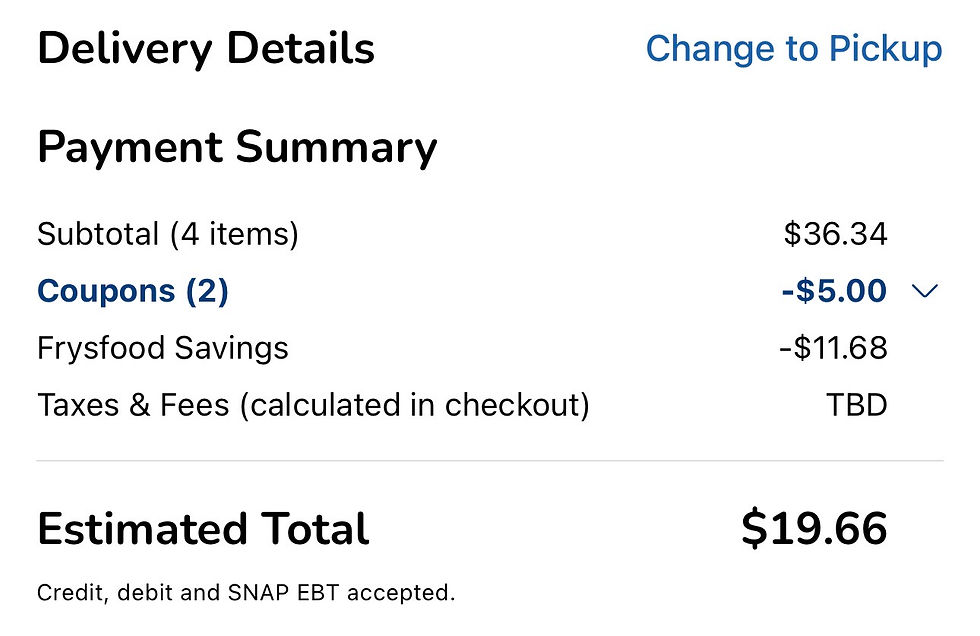
When ready, open the cart to review the order. The items you selected, your subtotal, any coupons or savings, taxes, and delivery fees will be viewable.
In the example below, we saved a total of $16.68!
Next, continue to Checkout. Choose between delivery or pickup, then choose the day and time that works best for you. Same-day delivery may cost more, so choosing a time one or more days ahead can save money.
In the example below, delivery as soon as possible today costs $14.95. Choosing a later time today lowers the fee to $9.95, while choosing a delivery time tomorrow costs $6.95.

Before placing the order, look for a tip amount that may already be selected. Tipping is optional, and the amount can be changed or moved. If the order includes heavy items, such as cases of water, a little extra of a tip may be nice.
Is a delivery membership worth it?
We can pay a delivery fee each time we order or buy a membership, which removes delivery fees when an order meets the store’s minimum.
A membership may save money if groceries are ordered once or twice a month. If you order only a few times a year, paying per delivery may cost less. Before joining, compare the membership price, delivery fees, and minimum order requirement.
Walmart+: About $98 per year. Free delivery on qualifying $35+ orders; Express Delivery may cost extra.
Fry’s Boost Essential: About $69 per year. Free delivery on qualifying $35+ orders.
Fry’s Boost: About $99 per year. Includes faster delivery options and may be useful for shoppers who use Fry’s coupons and weekly sales.
Amazon/Whole Foods: For Prime members, grocery delivery costs $9.99 per month or $99.99 per year. Check the cart carefully, since some items may ship separately or not count toward the grocery minimum.
What if we need something quickly that a retailer does not deliver?
Trader Joe's is an example of a retailer that does not offer its own delivery service.
When an items from a store like Trade Joe's is urgently needed, a third-party delivery service may help. You would download an app like Instacart, DoorDash, Uber Eats, Grubhub, Postmates, or Caviar. They can help get the item you need; however, they may cost more because of higher item prices, service charges, delivery fees, convenience fees, and optional tips.
If you would like to have an item delivered from a store that does not offer delivery, and you do not want to download a third-party app, call or email Bright Concierge. We can retrieve the item and deliver it to you.
How do I know when my groceries arrive?
Most grocery apps show the progress of the order. There may be status notifications such as your order is being prepared; the driver has picked up the order; or the driver is on the way. Many grocery store apps also show the driver’s approximate location in real time on a map.


What if the driver cannot find the home?
Delivery apps rely on map directions. In communities with multiple entrances, similar addresses, or confusing roads, the map may send drivers to the wrong location. The customer and the driver can call each other to ensure the driver gets to the right place.
To avoid confusion, it's a good idea to add delivery notes with useful details, such as the correct entrance, gate instructions, building number, or where you would like bags left.
See the example below.

What if something is wrong with an order?
Fresh food usually arrives in good condition, but occasional problems can happen. An item may be missing, eggs may be broken, or produce may not be in good condition.
If this happens, open your order in the store’s app and look for Help, Refund, or Report a Problem. Don't report the entire order as a problem. If three eggs are broken, report the damaged eggs. They may request a photo. Use refunds honestly and for real issues. Reporting every small disappointment may affect your ability to receive refunds in the future.
If you would like to skip the store, online grocery shopping tools provide a simple and comfortable way to keep a home stocked. You can shop on your own schedule, compare choices and prices, use digital deals, avoid the physical work of a store trip, and have heavy items brought to your door.
Bright Concierge makes it easier to get what you need from your favorite stores. In addition to one-on-one tutorials that teach you how to use online grocery shopping tools, we can also help with groceries and household shopping by:
Finding items that may be difficult to have delivered
Shopping from multiple stores when everything you need is not available in one place
Researching products and recommending options that fit your needs
Locating specialty items
Managing substitutions, order changes, returns, and exchanges
Setting up repeat orders for frequently used essentials
Receiving your order, personally bringing it to your home, helping unload it, and putting items away
Call (602) 612-9000 or email hi@brightconcierge.com to get started!


Comments